How to Download Full/High Resolution Photos from Flickr.com or Picasa (Google)

Flickr is a prominent photo website on the Internet. It mainly attracts professionals and photo-enthusiasts to upload, share and display their work and hence you will be able to see eye-popping photos there. Flickr is not known or promoted as such, until recently, as a photo sharing website where you can share photos with friends or family members and also let them download high resolution copies. On many websites like Facebook or on Instagram, you can share photos with your friends but there is no way for them to download high resolution copies on their computers.

Though Flickr allows users to download photos, it is not obvious for many of us how to download a friend's photo. To help you, I have put this simple step by step guide which can teach you in less than 30 seconds all you need to know. Now to help your friends download your photos, you can email the link to this web page or email them this short link http://goo.gl/PgatNi . After they click on this link, they will also be able to learn with step by step instructions how to download any photo on Flickr.
Please note that if the photo owner has disabled the download feature, you will not be able to download it.

Step 1: Open the photo that you want to download on Flickr and click on the 3 dots at the right side bottom of the image as shown in screenshot below:
Step 2: After you click on these 3 dots, a pop-up menu will open up. Click on View All Sizes as shown below:

Step 3: Select the image size. If not sure, click on the biggest size or Original size as shown below:

Step 4: Click on the Download link as shown below and your browser will prompt you to select the directory where you want to save this photo.


You are done downloading your image. If you want to download any more photos, repeat this process.

So next time you need to share photos with your friends or family members and you want them to be able to download full resolution photos, use flickr.com

How to Download Photos from Picasaweb.Google.com:
(Source: https://support.google.com/picasa/answer/39513?hl=en)
You can download pictures and entire albums from Picasa Web Albums onto your computer.

Download a photo:

  1. While viewing the photo you'd like to download, click Actions > Download photo.
  2. If necessary, select Save File in the window that appears.

Download an album:

  1. While viewing the album you'd like to download, click Actions > Download to Picasa.
  2. In the window that appears, click the Download button.
Albums downloaded from your own account will appear in the 'Web Albums' collection, while albums downloaded from friends and family will be visible in the 'Downloaded Albums' collection.

Which camera should I buy? Canon T5i, 60D or Nikon D7100? Or a point and shoot camera?

Most camera buying guides are either too generic or too techie. They miss to address one critical thing for most entry level digital SLR camera buyers. These days most SLR camera bodies are very capable. You can buy a Nikon, Canon, Sony or Pentax and there will be very little difference in picture quality. Many times we get disappointed with our camera but it may not be camera's fault. It may be the light. Or the settings on the camera. Low light level can create issue to even capable cameras. In good light, a $100 camera may give you a shot that is clearly better than a shot taken in low light with a $10000 camera!!
After using several models of cameras, I am indifferent to camera bodies these days. We end up spending too much time in deciding whether to buy Nikon D7100 or Canon T4i but in my opinion, it is the lens that gives an edge to your photos.

Buy the right lens with your digital SLR:

Ask yourself of the primary use of your camera. If you are going to use it to take day to day photos of family members, people and many times indoor or inside photos, you can improve quality of your photos with a fast prime lens. For portraits and for photos of people and pets, you can get nice bokeh / background blur with a fast prime lens that is generally difficult to achieve with a kit lens on the same camera body. Fortunately, you can get some prime lenses at a great price. Canon and Nikon offer  35mm or 50mm lenses with F1.8 or F2 for under $200. These lenses will also let you take nice indoor or low light photos.

Please remember that these lenses do not zoom in or zoom out. They are fixed focal length lenses so please be aware of this limitation. However zoom is not an issue in most cases as modern cameras take up to 24MP photos so if you are taking a landscape photo with a fixed 50mm lens, take photo in full resolution and crop it out. Please note that our 1080p HD TV needs only a 2MP photo to show in full HD. If you are posting online or on Facebook, it will not make difference to your viewer if photo is 4MP or 40MP!!! Most computer monitors also do not have more than 4 million pixels.
Now if you are talking about selling your photos and getting paid, you really need a high resolution photo but then  you are a professional and you should not be reading such articles or advice ;) Here I am trying to help people with their consumer grade DSLR purchase.

If you are going to take photos outdoor and landscape, your kit lens should serve you just fine. You can use your kit lens everywhere and if you are able to buy one more lens, buy a 50-200mm or 50-300mm lens and a good tripod. Ideally for landscape it helps to buy a wide angle lens too but that is a bit expensive for any brand and here we talk about amateur photography, we would skip expensive wide angle lenses.

Avoid 18-200mm or 18-135mm lens:
Many consumers want to buy DSLR but they hate to change lenses so they prefer to buy a lens like 18-200mm or 18-135mm which work as a wide angle as well as a zoom lens. If convenience is your prime objective and the quality of photos come later, you will be happy with such a lens. However these lenses are expensive and also they are not that fast. Normally these lenses will not work as good as a prime 35mm or 50mm lens for portraits or indoor photos.

Seriously consider Micro Four Thirds or Mirrorless Cameras: 
In my humble opinion, in this time when airlines charge fees for every bag we checkout or even carry in, no point in carrying a camera big with you! That big bulky SLR body needs to be left to professionals. New M43 or Mirror-less cameras are tiny and equally capable. Many of them have the same sized APS-C sensor that is found in bulky cameras. As there is no mirror in the body, the size of the body is tiny. Take a look at Canon EOS-M camera body! Most of my friends don't take this camera seriously until they see the photos taken with it. Mirrorless cameras have another advantage. They are easy to use in live preview/LCD mode!!
Also, it is easy to carry around! Plus most such cameras excel in video shooting. They auto-focus!
Please note that these cameras, as they have no mirror, are slow in focusing and also not that accurate at time in focusing. This is particularly an issue in low light or in darkness. I get annoyed with them at times but the size and form factor benefit is so outstanding, I live with this shortcoming. 


I started with kit lens and was find in the beginning. Then added a zoom lens and it worked fine too. Then I got on prime lenses and now most of the time, on my cameras, I have prime lenses. I rarely use 18-55mm kit lens or 55-300mm zoom lens these days. On my Pentax K-01 and Pentax K30, I have Pentax 50mm FA F1.4 lens and on Canon EOS-M, I have 22mm F2 STM kit lens or 50mm M42 Super Takumar F1.4 lens.

Two best camera kits in my opinion these days are Pentax K-01 with 40mm F2.8 XS lens and Canon EOS-M with 22mm kit lens! For less than $500, both of these are wonderful camera kits particularly for indoors and for portraits. If you try to buy this Pentax lens separately, it will cost $250!! No kit lens retails for more than $100 in my experience. Most of the kit lenses are not that great.
Canon EOS-M comes with a kit lens 22mm F2.0 STM lens. This is nice tiny camera which is as good as big bulky Canon consumer grade digital SLRs. It suffers with slow AF but the touch screen, AF during video, and the size that is so convenient to carry around, it is one of my favorite cameras I like to go out with these days.

What is this f word (I mean f number) in photography?

F is popular not only in Hollywood movies as some word but f number is even more popular among photographers!

F or sometimes referred to as f/ number, it simply mean how much shutter opens up while taking a photo. Smaller the number, wider the shutter/aperture opens. f/1.4 means shutter very wide open.  Don't get confused by F 1.4 or f/1.4. They all refer to as aperture 1.4. The smaller the number, the wider the aperture opens. On a 50mm lens, f/1.4 means that shutter is around 36mm wide (diameter) open!!! On the same lens, f/8 means the shutter will open around 6mm and f/22 means shutter will be open around 2.3mm!

How does f number matter for photos?

Even though 22 number for f is 15 times bigger than f/1.4 as a measure of diameter, in terms of area or light allowed to pass through in x amount of time, f/1.4 will take in whooping roughly 225 times more light!!!
In other words to take in same amount of light as f/1.4 in 10 milliseconds, f/22 will need 2250 milliseconds!!!

This article can be very technical but I am going to keep it useful from practical applicability.

The aperture or the opening of the lens or the f number also determines following:
  1. The higher the f number the smaller the lens opens. The smaller the f number, the lens opens wider.
  2. To take in same amount of light (or to get same exposure), smaller f number will need the shutter to stay open for smaller time period compared to a bigger f number.
  3. Importantly, f number also determines Depth of Field. Depth of Field is nothing but how much distance is in focus in your camera. With a smaller f number, very narrow band of area will be in focus. Say for f/1.4, if you are shooting an object 2 feet away, only an inch can be in focus. Say like the between 23.5 to 24.5 inches away from the lens!! Now for the same object, if you change f to f/22, a good 5-6 inches can be in focus! As an example, from 18 inches to 24 inches can be in focus.
  4. If you taking photos handheld and if you need to have more depth of field, you will need smaller aperture (higher f number). This will require you or the camera to use higher ISO and this can bring in some noise in the image.
Here are 3 photos I took of a flower in my backyard. I used Canon EOS-M and a 50mm Super Takumar F1.4 lens. As you can see, at f/1.8, only the flower in the center is in focus! Nothing else! Background is blurred and it gives a nice 3D kind of view!
When I changed to f/5.6, the second flower also came in some focus and some top leaves too. Now see the third image when I took a photo with f/16. Both flowers, full plant and some of the wall is also in focus. In first photo, you can't even see that there is a wall behind the plant but in the third photo, you can clearly see it. Also with respect to point number #4 above, the first photo has ISO of 100. The image has no noise. f/5.6 required ISO to be at 1250 and f/16 forced the ISO to 5000!! If you see carefully, in the last photo, you can see some noise or graininess.


Canon T5i or T4i? EOS 700D or Nikon D7000? Which camera is good in low light?

Once you buy your first DSLR, you mostly get disappointed by indoor or low light photos. Probably you expected your sort of expensive purchase to do wonders but most of them with their ordinary kit lens can do little bit batter than compact cameras but when light is really insufficient, they don't have magic to take great photos. This then takes you in your next pursuit for a camera that can taken nice photos indoor or in low light. You can run variety of searches for low light performance of Canon 700D vs Nikon D3200 or T4i vs Sony NEX cameras. You will read conflicting opinions and will likely to get lost. In my opinion, there is not much difference between any Canon or Nikon, or Sony or Panasonic which have similar sensor sizes and are released in the market not much apart in time. I would advise you not to get lost in the war of Nikon Vs Canon.
Here is a 2 minute primer for you.

Which camera works better in low light?

Remember these quick rules for low light shooting. It is the sensor size and sensor technology that determines the performance of camera in low light.
Normally,
* Bigger the sensor, the better the camera works in low light.
* Newer the sensor, usually the camera works better in low light. An APS-C sized sensor of Canon XS or XTi does not work as good as same sized sensor in Canon 650D or T5i. Canon XS photos with ISO800 may not be usable but T5i photos with ISO 3200 may be totally usable!
* For the same sensor size, the lower the mega pixels of camera, the better it is for low light shooting. Sounds stupid, right? However if you put too many mega pixels on the same sized sensor, the sensitivity of the sensor suffers and so does its low light performance. This is because each pixel becoming smaller and hence losing some quality with respect to light sensitivity. (Read this article about what is optimum MP that I should use on my camera.)


It is not the Camera body; it is the lens that does wonders in low light
Last but not the least, most kit lenses are very very slow. Most kit lens are F3.5 which are not that great when it comes to take in light. If you want to have better low light performance, you can buy fast 1.4 or 1.8 lens and your ability to shoot in low light will go up exponentially. What an F1.8 lens can achieve in low light compared to a F3.5 kit lens, spending even $1000 more on camera body can not do! If you are going to stick to kit lens only, your best bets are Canon EOS-M that comes with 22mm F2 lens or Pentax K-01 which comes with 40mm F2.8 lenses. I have both of them (and had some other regular DSLRs too) and I can say that they take much better photos in low light than T4i or D7000. Both of these camera bodies have top tier sensor size, technology and image quality. Now 700D (t5i) does have a good lens but it will cost 2-3 times more than the two cameras I have listed above. With the money saved, I would buy a fast 35 or 50mm F1.4 lens and most people would wow at your low light photos.
Your might like to read about my favorite DSLR value buy these days (2013)


Use Tripod
Now if you are taking low light photos, see what you are shooting. If you are shooting people or pets, even a tripod will not help you. Most of us move quick enough and will produce a blurry image. Now if you are taking photos of still objects, a tripod can come very handy. There is no simple set up for this but I would keep ISO to 100 (unless you are taking photos of plants where leaves can move or you are shooting the Moon of any even slow moving object), and f at 8-11 in Av mode. Or f at 2 to 5 if you need faster shutter speed and narrower depth of field. Will write more about this later some time but till then, please remember that it is not the camera that takes better photos; it is you who can take better photos with most cameras in most situations by becoming more pro-active.

Enjoy digital photography.
In last one decade more animals in the zoo are shot with digital cameras then the animals shot together over last 1000 years LOL. Once you buy a camera, it doesn't cost much to keep shooting.

Learn this simple button- EV compensation/ Exposure Bias

Many times when you take photos, they come out dark and people's face are also too dark (especially on a beach or in snow) or sometimes faces get washed out (particularly when background is a bit darker).

Camera is a machine and many times, it doesn't understand what is in front of the lens. It is programmed (particularly in AUTO mode) to take say x amount of light (light is measured in Lumen but it is hard to interpret). So on a beach when everything is too bright, camera tries to take in x amount of light but that is too less to properly expose human faces. That is the reason we look darker on a beach, on snow or on a bright day. Opposite happens in evenings or in dull light. Camera tries to take in x amount of light but that exposes the faces too much causing people in the photo to be washed out.

Probably you are not aware but somewhere on your camera, you will see this icon or a button with + and - minus sign as shown below. It is called EV (Exposure Value) button or Exposure Compensation button.
Please note that some cameras don't allow EV compensation in AUTO mode. If this is the case, hopefully, your camera has P (Program) mode and you can use it with EV compensation.
Sometimes it is also referred to as Exposure Bias. Click on it and it will open up a scale or a value on your LCD.

You will see a number with + or - sign or a scale which has a value bar with values from -3 to +3 or -2 to +2 as shown below. Which scrolling button or with directional control buttons on your camera, you will be able to select any plus or minus values.


So what is the big deal about this?
By selecting a value here, you can tell your camera to take in more light or less light! This can come very handy to brighten up those dark faces or make those washed out faces more pleasant!!
To tell camera to take in more light, select any positive value. Don't rush to select too high of a value because that can wash out the whole photo! Start with +.3 or +.7 and camera will take in 30 to 70% more light. This can help get people nicely exposed in your photos.
To tell camera to take in less light, move the slider/value in the other direction. Start with -.3 and your camera with take in 30% less light!

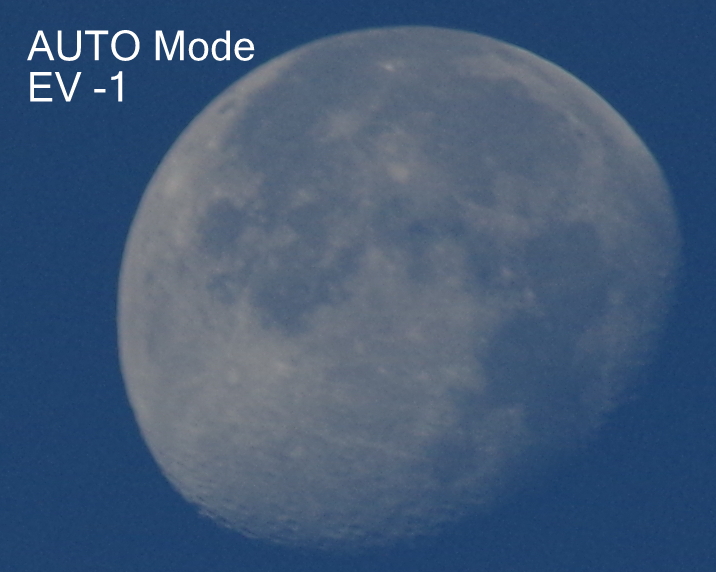
To show this with some images, I shot the moon in the sky with my camera with different EV values or Exposure bias. With 4 different images, I can pick the one that comes out better. Probably I could have take photos of people on beach to show this more effectively. However with these photos of the Moon, you can see how camera takes in less light with my pressing of the EV button!
Luckily my Pentax K-01 took the right exposure in the AUTO mode but take out your camera tonight and try to take a photo of the Moon in Auto mode. Mostly it will be washed out. Then start with negative EV values and at some value,  you will have a nice capture of the Moon!
It is not the camera that always takes good photos! Many times it is a little help from the cameraman that helps camera take a nice photo.